Sunday, June 22, 2014

KScope14 (Sunday) - APEX Symposium - before noon

Sunday is typically the day where the Oracle development team is on stage to talk about what they do, give insight in the product etc. - for me personally one of the highlights of the conference.

The Awesome Evolution of Oracle Application Express 5.0 by Joel Kallman


Joel demoed HTML DB 1.6 again, the predecessor of APEX - went live in 2004, so 10 years ago (time goes fast!). Next he timed doing development in APEX 4.2 compared to APEX 5.0.  

Conclusion: APEX 5.0 is more productive, efficient, intuitive, modern and easy.

Joel highlighted the other new features in APEX 5.0, most of them I already blogged about or you find them here.


The Game Changed - APEX Designer by Patrick Wolf

Patrick showed the time it takes to build components and items in previous versions of APEX. Next he compared it to how you do things with the new Page Designer in APEX 5.0.

There're so many new features in the Page Designer, just give it a try to explore them. It will take a bit of time to get used to them, but it will be the future. 


Turbo Mobile Development by Marc Sewtz

APEX uses jQuery Mobile behind the scenes. APEX 5.0 includes the latest version (jQuery Mobile 1.4). The philosophy is to create "mobile first" applications.
APEX 5.0 will include a new mobile theme, which support the new jQuery Mobile swatches. It's very easy to use ThemeRoller to create your own swatch and upload the zip in Shared Components in APEX and add a style to the theme and make it active.

There are many more new features in APEX 5.0 for mobile development like for example a new region type called "Reflow table".

Friday, June 20, 2014

APEX 5.0 - Page Designer; immediate feedback and more

In APEX 5.0 you (can) develop in the new Page Designer.

The Page Designer makes you way more productive, less clicks and quicker results. You have to get used to it, and you probably want a big monitor (time to ask your boss!), but once all that is done - you will love it.

The Page Designer is so intuitive and attention was put in the details. When you make a mistake APEX gives you immediate feedback. Here's a screenshot:


The region where the error is, is highlighted.
You get a notification message top right in red with the error message and inside the property panel it's highlighted what you need to change. Once you click on the field it will give another text notification e.g. that it is required.

There's also the Messages tab which gives you an explanation of what is wrong. Clicking on the link will bring you right where you need to go.

But just look at the Page Designer for a while; notice the small top left red triangles; it identifies it's a required field. The "Show Common" and "Show All" tabs are great too.

So many things, small, large, ... but so useful.

Here's another one - Developer Comments for the page. If there are comments you see a number in the comment icon. When clicking on the icon you can add more comments. I believe it would also be useful to see the existing comments, hopefully that will be in the final release.


This post is based on Oracle APEX 5.0 EA2, but there's more coming it looks like. Linked to the previous feature, I see a tighter integration with Team Development already too.

So many things to explore in the APEX 5.0 Page Designer... definitely worth your time.

Thursday, June 19, 2014

APEX 5.0 - Button Appearance (template options + Font Awesome)

With the new template, the new buttons for example are highly customisable in APEX 5.0
(icon on the left or right, spacing between, etc.)


In the Appearance section you find kinda the same options as in APEX 4.x, but when you look a bit further, there's so much more now.


You can declaratively change the way your button looks like, by clicking the Template Options:


The icons you can chose for your button are based on Font Awesome, a great scalable vector icons library.

I use Font Awesome in APEX 4.x too, but I had to create a new button template and put the name of the icon in the class section. This is now all integrated and declarative in APEX 5.0.

APEX 5.0 - Keyboard shortcuts

Develop even faster? use the keyboard shortcuts in Oracle Application Express (APEX) - you find them defined here:


Here's the list:
  • Display From HereCtrl+Option+D
  • Display From PageCtrl+Option+T
  • Go to Dynamic ActionsOption+2
  • Go to Gallery ButtonsOption+9
  • Go to Gallery ItemsOption+8
  • Go to Gallery RegionsOption+7
  • Go to Grid LayoutOption+5
  • Go to HelpOption+F1
  • Go to MessagesCtrl+F1
  • Go to Page Shared ComponentsOption+4
  • Go to ProcessingOption+3
  • Go to Property EditorOption+6
  • Go to RenderingOption+1
  • Keyboard ShortcutsOption+Shift+F1
  • Page SearchCtrl+Option+F
  • RedoCtrl+Y
  • Restore/ExpandOption+F11
  • SaveCtrl+Option+S
  • Save and Run PageCtrl+Option+R
  • Toggle Hide Empty PositionsCtrl+Option+E
  • UndoCtrl+Z

  • For Mac users like me; the Option key is "alt". For the F1 etc. use "fn".

Oracle APEX 5.0 EA2 - first impressions

You can now request a workspace in the brand-new version of Oracle APEX 5.0 (EA2).


Once requested a workspace you will get an email to activate it - and you're up-and-running!


The login screen looks awesome:


And then you see the new APEX Builder - new theme, with all new icons:


The Application Builder looks different now too - look at the nice icons and new style of Interactive Report:


Creating a new application - the wizard is more streamlined:


Creation of a new page is now with a modal window implementation:


When finished it opens the page in the new Page Designer:


It looks like all the components are now available in the Page Designer (Shared Components for ex. wasn't available in EA1 - but it is now)

Creating new pages work well and the new universal theme (theme 42) looks nice too.

Oracle APEX went flat design, with bright color blue and grey and nice icons (which are available as a font).

More to come in other blog posts... have fun! and thanks to the APEX Development team for another great release.

Wednesday, June 11, 2014

APEX 5.0 EA2 available in the next days

Joel just blogged that the 2nd Early Adopter release of APEX 5.0 is around the corner.

Here are some screenshots posted on twitter:


I'm sure this new EA will carry many changes and looking at some screenshots it looks awesome.
I especially look forward to the new universal theme.

Here's what should be in - based on the statement of direction of APEX 5.0 :

Oracle Application Express 5.0

Oracle Application Express 5.0 will focus on both new features and enhancements to existing functionality to improve developer productivity and is planned to incorporate the following:
  • Page Designer - New page definition IDE which incoroporates tree controls, drag and drop layout editor, and a property editor.
  • Multiple Interactive Reports – Allow any number of Interactive Reports to be defined on a single page.
  • Modal Dialog - Enhance the ability to declaratively define modal dialogs.
  • Navigation Lists - Ability to define hierarchical lists for navigation, with pull-down menus and sub-menus, instead of being constrained by tabs.
  • Mobile - Enhanced responsive tables, including reflow tables and column toggles, and introduction of panels.
  • Calendar – New calendar region which allows duration based events, improved functionality, and better control over drag and drop operations.
  • Universal Theme – A new central theme which readily allows developers to customize simply using CSS.
  • HTML5 Capabilities – Improve native capabilities for handling HTML5 constructs.
  • Application Builder Security – Allow different authentication schemes to be used to control developer access to the Application Builder.
  • Numerous functional improvements.

Oracle APEX Cookbook: Second Edition

For the first Oracle APEX Cookbook I was involved as a reviewer.

Michel and Marcel updated their book end of last year, but I didn't take the time to blog about it yet - and months fly. The concept stayed the same as the first edition, but it got updated with the latest info for APEX 4.x.

"People who followed a beginner training or learned APEX at their own and they want to know how to do a specific thing which is covered in the book, it's great to have the book, as you can just follow what the authors wrote and you also have an idea why it's done like that."

If you need onsite Oracle APEX training, you can also contact my company APEX R&D :)

Tuesday, June 10, 2014

Social Authentication (Facebook) in WC2014Challenge

People expect these days from a public website you can authenticate with Facebook, Google+, Linkedin, Microsoft etc. It's very convenient as you don't need to create a specific account per website.

Background

All of the social networks have very good documentation how to call their APIs.
Here's for example the Facebook Login explained.

Most of the API's use the OAuth2.0 protocol, there's an application key and tokens that are send with the requests. Here's an overview how it works with Google+


So how easy is it in Oracle Application Express (APEX) to do such social authentication?

Unfortunately Oracle APEX doesn't provide us with a native social authentication mechanism just yet. But nothing prevents you from building it yourself.

Here are the options I reviewed:

  • Custom build; in PL/SQL you call the different url's and make some procedures public so when the social network comes back you can intercept the call and move on.
  • Oracle REST Data Services supports OAuth 2.0 and the calls are mostly REST calls, so I also looked into writing the logic in ORDS (and PL/SQL) and integrate that way with my APEX application.
  • Some people in the community wrote an authentication plugin which does the hard work for you.

I went with a combination of the Facebook plugin in combination with my own PL/SQL code.
Peter was so nice to share his work with me, thanks again for that Peter. I first thought that the authentication plugin would be plug-and-play, just like the other APEX plugins... but that is not the case.
It hasn't much to do the way Peter's team implemented it, it has more to do with the complex setup of SSL certificates etc. So when downloading the plugin, know that it will take some time to configure it. Luckily Peter provides good documentation so it makes it a bit easier.

So, to see the authentication to work, login with your Facebook account on the wc2014challenge.com site. I extended the plugin a bit so it will automatically create a site account for you behind the scenes so regardless if you create a site account or login with Facebook it can hook up the scores, bets etc. in the same way.

Challenges with Social Authentication

If you want to provide Facebook, Google+, LinkedIn and a normal site account in your app, I found some challenges with that. How do you hook-up a person that logs-in with Facebook the first time, with the same player logging in with Google+ the same time? You could use the email address maybe? But what if they use different ones? There are many blog posts about this topic and how to get around it, but it would bring me to far in this post. I might do a follow-up post later as it's an interesting challenge.

Future 

I really believe that most public sites will allow social authentication, so I hope the team of ORDS or the APEX development team will make something available to do the social authentication natively in the future. I believe that would be the best solution (fast to implement and secure).

Monday, June 09, 2014

Security Audit of WC2014Challenge

A few weeks ago I asked my friends at RecX to do a security audit of the World Cup 2014 Challenge app.  The result was a security assessment document which explained what they tested, an explanation why it was important and the results they found. I found it very interesting to see how other (security) people approach your code.

Here are the areas they went into:

Access Control

  • Hidden items
  • Item Protection
  • Page Access Protection
Configuration
  • Session Timeout
Cross-Site Scripting 
  • Column From LOV/Query (make use of )
  • Direct Output
  • Indirect Output
  • Report Column Display Type
  • Template Variables
Tip: make use of apex_escape.html, apex_escape.html_attribute, utl_url.escape

Data Protection 
  • Page Autocomplete
Tip: Ensure sensitive data is not held in the browser cache

Warnings
  • Direct URL
You can read more about security in their Hands-On Oracle Application Express Security book.

Thanks Nathan and Tim.

Tuesday, June 03, 2014

Automatic Time Zone Support in WC2014Challenge

How do you show to people in different timezones the schedule in their own time?

That is the issue I had when building the wc2014challenge.com site.

So I started to just show the schedule in the "local time" of the stadium the match was in, so I didn't have to deal with the issue :)

But as you might think, people started to ask to see the schedule in their own time.

In previous years I solved the issue by adding a select list, so people could select the timezone they wanted to see the game in. Behind the scenes I reran the query and added the offset to the time - that worked just fine. Now the challenge this year is that the Brazilian timezone exist out of two timezones, so I couldn't really use the mechanism of before.

In the Oracle database, instead of a date column, you can use a timestamp with timezone column and can better calculate the difference. Another way is to use the "timestamp with local timezone", so you see the data in your timezone (after alter session set time_zone = your timezone).

Instead of doing the timezone conversion, I also thought of doing it on the client (browser), with momentjs for example.

They all have advantages and disadvantages... but at the end I decided to use the native APEX way.

Step 1: make sure your column is of type TIMESTAMP WITH LOCAL TIME ZONE:


Step 2: set Automatic Time Zone to Yes in "Edit Globalization Attributes" (Edit definition of your app).


And you are done!

Looking at the schedule it shows the times in my timezone, automatically. The nice thing is that this is cross application, so the calendar automatically shows the times in your timezone too. Very, very nice - no additional code.


So it's very easy to make your APEX application time zone aware... the only drawback I find is that this solution requires a redirect the first time you hit the site. That is not really good for Google rankings, but the advantages weight way more than that for now.

You can also read Joel's blog about automatic time zone in APEX 4.0, he build another example which you can follow.

Thursday, May 08, 2014

World Cup 2014 APEX Betting app online

You remember the old days? 2006 ... APEX aka HTMLDB was still the new kid on the block!

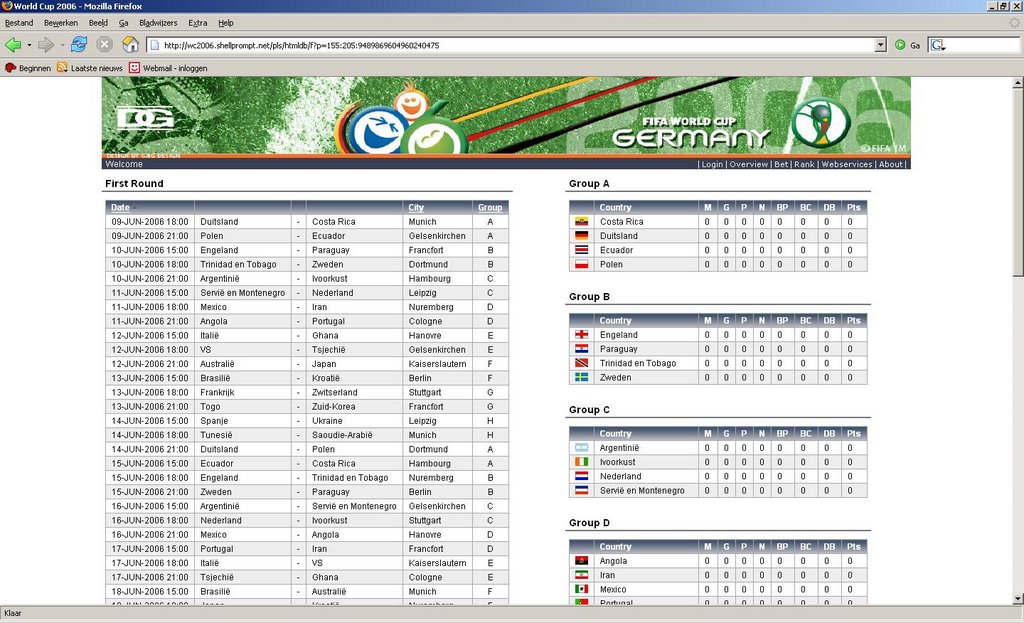
To promote APEX at that time I build an Oracle APEX app that allowed you to see the scores of the World Cup 2006. After some feedback I created a betting piece to it... it gained much traction, it even got translated in Chinese! Here's a picture of that time:


Since then every year with the World Cup and Euro Cup I enable the app again. This year is not different... well it is; the app got an overhaul with some great new functionalities. I'll go deeper in some features in another blog post; but the main features are: authentication via Facebook (thanks to Peter) and you are able to create your own groups of people. So APEX R&D can see for example how it plays against our Canadian friends at Clarifit or our US friends at Enkitec :)

You find the new app at https://wc2014challenge.com


Let us know if you like it (or not) :)

Friday, April 11, 2014

Install latest patch of APEX 4.2 (4.2.5)

A few days ago Oracle brought out a new patch for APEX 4.2, this will be the latest version of this build, the next version of APEX will be 5.0.

If you already have APEX 4.2.x installed you can download a patch from support.oracle.com, the patch number is 17966818.

If you have an earlier version of APEX you can download the full version of APEX and install that.

As with other patch sets, this one is not different; it includes some bug fixes, updates in the packaged apps and the introduction of some new apps. You find the full patch set notes here.

Installing the patch in my APEX 4.2.4 environment took less than 15 minutes and everything went fine. 


I recommend everybody moving to the latest version as this is the final build of APEX 4.2.

Update 16-APR-2014: we actually hit one issue, which was fixed by Oracle today. So I would install this additional patch too. In support.oracle.com search for Patch 18609856: APEX_WEB_SERVICE.CLOBBASE642BLOB CONVERTS INCORRECTLY.

Wednesday, February 26, 2014

APEX Listener => Oracle REST Data Services


Yesterday a new version of the Oracle APEX Listener was released. The new version is 2.0.6... and the biggest change in this release is the change in name. From now on we won't speak about the "APEX Listener" anymore, but we speak about "Oracle REST Data Services".

The name explains more what the piece of software is doing and it will be less confusing for non-APEX people. Many people thought about the Database Listener when talking about the APEX Listener. Or others just wanting REST, don't question the use of APEX anymore.

The "Oracle REST Data Services" still carries the same purpose for us as APEX developers:
- serve as a replacement for the (older) mod_plsql
- enable the RESTful Services in APEX (found in SQL Workshop and Application wizard)

Wednesday, February 12, 2014

Some help with the Oracle APEX Theming Competition 2014

ODTUG announced a few days ago the Oracle APEX Theming Competition.

Make an awesome APEX theme and you may win some cool prices!

In the Learning Resources on the ODTUG site you will see a reference to my presentation of last year "Advanced Responsive Design in APEX". In that presentation I showed a lot of live demo's from different aspects of Responsive Design: here's a quick overview of what I covered:


I made the RWD demo app available online now, so you can see it in action or you can download the app and install it in your environment (the zip includes the presentation too).

Hopefully it will help some people doing a responsive design theme.

Another tip that might help; make use of SASS or LESS to generate the CSS. There's a great SASS tutorial (video/material) on SASS from Hampton Catlin, the creator of Sass, which explains why and how to use it.

I look forward to the result of the competition. I'm always impressed with what people come up with.

Tuesday, February 11, 2014

The evolution of APEX Evangelists

Every year we at APEX Evangelists come together to discuss the past and the future of the company.
In the past 7 years a lot has changed; the APEX market changed, the community changed, we personally changed, ...

We really like APEX, we are all passionate about it, we love to have technical discussions with each other and come together to share our thoughts, but we also like our independence and make our own trade-offs company wise.
So we decided to go a different route with "APEX Evangelists". And that’s why we’re now in the midst of transforming APEX Evangelists from a company to a network.
A network of APEX experts. A network without any financial incentive behind it. A network of independent people that are passionate about APEX. A network of recognised experts in the Oracle community. A network with members that can rely on each other and trust each other.


You can also become part of this network, but only by invitation and acceptance by the other members.
We love to compare us with the Oaktable network, which is a network of experts for the Oracle database. We hope that "APEX Evangelists network" will be the same for Oracle Application Express.
The first addition to the APEX Evangelists network is Martin Giffy D’Souza and we hope to grow the network further in the next months.

The new website of APEX Evangelists is live which reflects the network now, you find it at http://www.apex-evangelists.com

If you're wondering what else the future will bring for me, check out APEX R&D, the company I'll move forward with.

Friday, February 07, 2014

APEX 5.0 (EA): CSS Calendar

APEX 5.0 allows you to create a new Calendar type, called CSS Calendar.

The CSS Calendar is based on Full Calendar 1.6.4, at the moment of writing, the current latest production release. The creator of this JQuery plugin, Adam Shaw, is currently working on version 2. A few days ago he released beta 2. It remains to be seen which version of Full Calendar will make it in the final release of APEX 5.0.

Following the wizard in APEX allows us to add a Source for the calendar.
You can just enter a SQL query here.


In the next step you define which column contains your start date, the end date etc.


There are some nice features that come with Full Calendar, for example the integration with Google Calendar and JSON (APEX WebService URL). Another interesting feature is the export to different formats like iCal and CSV.

Finally running the page shows you the new CSS Calendar. You can change the color scheme of the calendar by changing the css.


This CSS calendar is also responsive... when you make your screen smaller the calendar automatically switches to the Week view.


The only thing that's missing with this calendar is a year view... there are people who created extensions for example here and here to offer the year view. Hopefully version 2 of FullCalendar will add the year view native. Wonder if the final release of APEX 5.0 will include the year view too...

APEX 5.0 (EA): Feedback Page

One of the first things I do when creating a new application is enabling the feedback mechanism in combination with Team Development.

Click the Create Page button in Application Builder and select "Feedback Page":


The next step looks like this:


The Page Mode can now be set to Modal, so instead of a popup it will render as a modal.

Note that in the EA1 version there are some known issues with the Feedback Page, which will be resolved in one of the next iterations of EA.

One issue made me think that once I upgraded my applications to APEX 5.0 I probably want to start searching for "apex.navigation.popup.url" and change those to become the native APEX 5.0 modal windows. It's those "small" things like declarative modal windows which make a big difference in development effort and clean code. But more on modal windows in a dedicated post.

I love the Feedback mechanism and how it integrates with Team Development, but if it had one more feature, I would be thrilled. It's great to know session state, it's great people can add a comment, but sometimes a picture shows more than a 1000 words. So if we could click a button that took a screen capture and we could annotate that... wouldn't that be awesome? The result would be an image with the feedback in Team Development.

Some of us in the community build some custom solutions to do that. For example Martin and I "hacked something together" for the OSN-competition at OOW which did the screen capture and annotation, but having such a feature native in APEX and integrated with Team Development would be even better :)

Wednesday, February 05, 2014

APEX 5.0 (EA): Creating a new application

Lets see how creating a new Database application works in APEX 5.0 and what was changed compared to APEX 4.2.

In the Application Builder you start by hitting the Create button.


There are a couple of improvements here:

  • You'll see APEX 5.0 includes a complete new set of icons which are flat and fresh and immediately give you an insight what the button is doing. This is throughout the entire release.
  • The icons are now driven by base64 encoded strings in css which is more performant than to call every icon as a separate image (what happened prior APEX 5.0).
  • There's a direct link to create a Mobile application

Next we will define the name and id of our application


The improvements here lay in:

  • The cleanup of the screen; some options are now moved to an advanced attributes section
  • You select the theme already at this stage instead of waiting till the end
  • The default theme is now "Blue Responsive (Navigation List)", which makes a lot of sense as its inline with the industry standards to make responsive applications. The "Navigation List" replaces the "Tabs" of before. Personally I already used Lists to do the navigation in 99% of the cases in APEX 4.x, as they are way more flexible than Tabs, and if you want you can give the List the look and feel of a Tab anyway.
  • New is the "Theme Style" which has currently two options: Default and Red. So the themes in APEX 5.0 will be easier to change based on a style. The main HTML in the templates stays the same, but with a different css you get another look and feel.

Moving on in the wizard gives the possibilities to add pages to the application.


Improvements lay in:

  • The look and feel
  • More intuitive icon in front of the page to edit the page (see next screenshot). In APEX 4.x you could edit the page to by clicking on the name of the page. That gave a popup window, where in APEX 5.0 it's implemented as a modal window. This is a good showcase of the new Modal window feature of APEX 5.0 which you can define declarative now (more on that in another post).


The final screen gives an overview of the application and what APEX will create.


As you can see, already in the creation of a database application in APEX 5.0 many new features and small enhancements are included.

Tuesday, February 04, 2014

APEX 5.0 (EA): Overview

Now that APEX 5.0 EA is out, it's time to do a deep dive in the new features of this early adopter (EA) release.

Overall this new version of Oracle Application Express tries to put even more power and speed in the development. The UI is made simpler and cleaner with a fresher look and feel.
Not every part of APEX got an overhaul in EA1, it remains to be seen if in EA2 more pages are updated.

I'll update this post with links to the more detailed blog posts of the specific parts.


So stay tuned... this post is the index for the next series of APEX 5.0 (EA) posts.

Friday, January 31, 2014

APEX 5.0 (EA) Page Designer video's

APEX 5.0 early adopter is about to be released in the public.

Requesting a workspace is not working yet at the time of writing this post, but I expect it can be opened every moment now.

APEX 5.0 carries many new features, one of the biggest is the new Page Designer which should increase developer productivity even more. David Peake recorded some videos, here's the APEX 5.0 Page Designer Overview:


You find more detailed videos for the specific sections of the APEX 5.0 Page Designer on YouTube:

Congrats to the Oracle APEX development team for delivering APEX 5.0! It looks awesome.