I'm heading back to Belgium at the moment... It was a very busy week at OOW but I enjoyed it very much. I still plan to do some more blogging once I'm back.

I created this Blog to share my knowledge especially in Oracle Application Express (APEX) and my feelings ...
I'm heading back to Belgium at the moment... It was a very busy week at OOW but I enjoyed it very much. I still plan to do some more blogging once I'm back.

Posted by
Dimitri Gielis
at
01:16
0
comments
Labels: oow
Today I had a more relaxing day in San Francisco. After having done some work in the morning I went out with John and Rich. We had some nice food in the most famous Chinese place in San Francisco "House of Nanking". We went to that place for the first time in 2007, when Carl B. recommended it and took us there. Again the food was excellent.
Posted by
Dimitri Gielis
at
06:13
1 comments
Labels: oow
It's Saturday today and I'm currently in the Hilton hotel on O'Farrell Street in San Francisco.
Posted by
Dimitri Gielis
at
17:24
2
comments
It was a long time ago I promised this post, so finally today I found some time to finish the post.
In APEX 4.0 the Tabular Forms got enhanced quiet a lot. To make use of these enhancements it requires some manual changes of the page the tabular form is on, so when you upgrade your existing APEX 3.x (or older) applications the tabular forms are NOT upgraded automatically (or at least not completely), but they should still work like they did before.
The enhancement I want to discuss in this post is Adding a row to the tabular form.
Before APEX 4.0 when you hit the Add Row button, the page got submitted and a specific Add Rows process on the page got called.
In APEX 4.0 that changed: the page is not submitted anymore. When you hit the Add Row button, some javascript (addRow()) is called to add a new row to the tabular form.
So to make use of this enhancement, you need to make three changes:

select WORKSPACE, APPLICATION_ID, APPLICATION_NAME, PAGE_ID, PAGE_NAME, PROCESS_NAME
from APEX_APPLICATION_PAGE_PROC
where PROCESS_TYPE in ('Multi Row Update','Add rows to tabular form')It results in the below output and shows which pages you still have these processes on:
Posted by
Dimitri Gielis
at
13:03
3
comments
Labels: apex4, tabular forms
Running on Mac OSX is great and although most of the time I have a native Mac OSX app I can use, it sometimes happens I want to run a Windows-only program e.g. Internet Explorer (just to see if my app works in this browser!), BI Publisher plug in for MS Word, PL/SQL Developer or Schema Compare for Oracle.
So the options are running a Virtual Machine (I use VMWare Fusion) or use a program like CrossOver (Windows emulator based on Wine). Not all applications work with CrossOver, but it's worth trying to get it working there as it's more lightweight than firing up a VM.
In this blog post I'll show how to install PL/SQL Developer in CrossOver.
Once CrossOver is installed, you click Configure - Install Software.
Select Other Application and in Select an installer search for plsqldev804.exe file (which you can download from the PL/SQL Developer website. Finally hit the Proceed button to do the install. You just follow the wizard from PL/SQL Developer to finalize the install.
Once that is done we'll have to install the Oracle client so we can connect with PL/SQL Developer to our Oracle database. Easiest will be to download the Instant Oracle Client for Microsoft Windows (32-bit). Unzip the file and copy the directory to your C-drive. To open the C-drive: in the CrossOver menu click on Manage Bottles - Advanced Tab - Open C: drive in Finder.
Next you'll have to set the Environment Variables, so PL/SQL Developer knows where it can find the Oracle Client. Edit the cxbottle.conf file which you find in C:\
Add in the [EnvironmentVariables] section (depending your db characterset):
ORACLE_HOME=c:\instantclient_11_2
TNS_ADMIN=c:\instantclient_11_2
NLS_LANG=AMERICAN_AMERICA.UTF8
Next create a tnsnames.ora file with the connections to your database e.g.:
ORCL = (DESCRIPTION = (ADDRESS = (PROTOCOL = TCP)(HOST = localhost)(PORT = 1521)) (CONNECT_DATA = (SERVER = DEDICATED) (SID = ORCL)))
and copy that file into c:\instantclient_11_2 (or the directory you unzipped the Oracle instant client)
That's it... if you now start PL/SQL Developer (CrossOver - Programs - PL/SQL Developer), it will look like it's a native OSX app.
I had to do one more thing to get it complete like on a real Windows system. The icons in PL/SQL Developer looked a bit funny (gray/black - not really readable).
To solve that, go to PL/SQL Developer - Tools - Preferences - User Interface and uncheck Faded disabled buttons.
Posted by
Dimitri Gielis
at
08:23
7
comments
Labels: crossover, instant oracle client, osx, plsql developer
When you create a report in APEX and build the source of that SQL query with the wizards you get these annoying quotes (") around the column and table names. It also takes time to do it with the wizard, time I don't have.
I tend to write my queries in SQL Developer so I can immediately fine-tune the query so it's exactly what I need. Writing your queries in a tool like SQL Developer has many more advantages, as you can look back in the history of your statements, you can immediately do an Explain Plan and format the code but even more immortantly it's very fast to write statements.
Let's say you need to write a query that joins four tables, you can just write it manually... Or your could just select the tables from the tree and drag them on your SQL Worksheet. SQL Developer will ask if it needs to join the tables for you and write the statement. It uses aliases for the tables, which is also something I like better than using the full table names in front of the columns...
Remark: you need foreign keys in place so the joins are written correctly.
As I saw many people didn't seem to know about that, I thought to quickly write something as it's definitely a time saver.
Posted by
Dimitri Gielis
at
09:03
1 comments
Labels: apex, join, report, sql developer
I tend to use the Grouping functionality to logically group my APEX pages.
E.g. I've a group called 'Admin' which hold all the Admin pages.
I find it easy to see the pages for that section of the application and I can verify if my security model is fine on these pages. E.g. the pages should be protected with the Admin Role.
It also helps me to separate the work between developers. If I tell my colleague, go and change the Admin section, it's easy to find for that person.
You can also use ranges of pages for the different sections of the application.
E.g. 10000-20000 is for Admin pages.
Before APEX 4.0, the Grouping of Pages was in the Task area on the right hand side of the page, but that got changed. Now you find a lot of the Goodies in "Application Utilities" (see red arrow in the quick pick icons).
Clicking on that link will give you access to the Application Dashboard, the Upgrade Application wizard and many other features. On that page on the right hand side you'll see Page Specific Utilities.
Clicking on the "Cross Page Utilities" link will give you the links for grouping pages or bulk editing them (a feature I use a lot too, to rename my pages for ex.).
So the grouping feature is a bit more tucked away in APEX 4.0, but then you get a more logical grouping of features you can do.
Posted by
Dimitri Gielis
at
09:26
0
comments
Labels: apex4
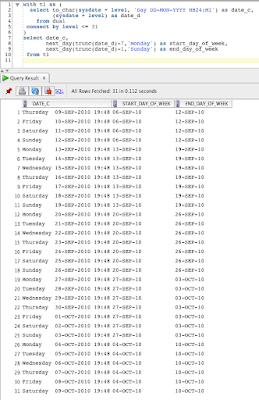
I just got an interesting question: how do you know for a date, in which week (Monday - Sunday) it falls.
I created a little test script to get 31 days of data:
(date_c is the same as date_d, but in a more readable output. c stands for char, d for date)
select to_char(sysdate + level, 'Day DD-MON-YYYY HH24:MI') as date_c,
(sysdate + level) as date_d
from dual
connect by level <= 31
with t1 as (
select to_char(sysdate + level, 'Day DD-MON-YYYY HH24:MI') as date_c,
(sysdate + level) as date_d
from dual
connect by level <= 31 )
select date_c,
next_day(trunc(date_d)-7,'Monday') as start_day_of_week,
next_day(trunc(date_d)-1,'Sunday') as end_day_of_week
from t1 
with t1 as (
select to_char(sysdate + level, 'Day DD-MON-YYYY HH24:MI') as date_c,
(sysdate + level) as date_d
from dual
connect by level <= 31 )
select date_c,
trunc(date_d,'iw') as start_day_of_week,
trunc(date_d+7,'iw')-1 as end_day_of_week
from t1
Posted by
Dimitri Gielis
at
21:49
7
comments
In a lot of my APEX 3.x projects I used jQuery to extend the standard functionalities of APEX with some more interactive (client-side) components.
In jQuery there are very nice plug-ins, like a modal window, a grid, tooltips etc.
If you try to run your APEX 3.x application in APEX 4.0 you might find these jQuery components/plug-ins are not working anymore. The cause can be multiple:
But going forward I'm converting all my custom javascript and jQuery plug-ins to APEX plug-ins and the files get loaded as part of the plug-ins. A lot of the javascript can disappear as it can be replaced by the build-in Dynamic Actions of APEX 4.0.
In the last weeks I migrated more applications from APEX 3.x to 4.0 and thought to share my thoughts on the Theme and Templates part of the application.
I've applications that were initially build in APEX (HTMLDB) v2 and other build straight with APEX 3.x. Some applications used a build-in theme, but more had a custom look and feel.
Most migrations went ok, but I did have issues when I used templates which didn't have all tokens (#...# things in html that get replaced at run time by APEX) e.g. with tabular forms (but I'll do a specific blog post on that - and is already a known issue).
I'm personally following the path of installing a new APEX 4.0 theme for my application and apply changes to that to get the same look and feel I had before. Or at least I verify my custom templates to support the new APEX 4.0 features.
I also try to update it to a nicer and more up-to-date look and feel.
The reason why I'm following this approach are multiple:
Posted by
Dimitri Gielis
at
20:57
3
comments
It's an annual tradition, so also this year we'll organize an APEX Meetup at the 4th Street Bar & Deli on the Tuesday (7.30 PM) during Oracle Open World.
Here you find some pictures of last year. As you can see, it's always fun with nice people, drinks and food.
Every year we get more people during the meetup, so we started to get sponsors to help to pay for the bills ;-)
Thanks so much to our sponsors of this year:
- Oracle Technology Network (OTN)
- Oracle Development Tools User Group (ODTUG)
- APEX Development Team
If you or your company wants to sponsor aswell, feel free to send me a mail or add a comment to this post. The current total to spend is $500 :-)
See you soon!
Posted by
Dimitri Gielis
at
11:21
4
comments
Labels: apex meetup, oow
Over 4 years ago I wrote a blog post about software that helps you to compare two Oracle schemas. That post is accessed a lot and I still get questions about it, so I decided to write a follow up on that post as things change over time.
Comparing two Oracle schemas is still something I have to do regularly, e.g. if I want to compare a development, test and production instance after a deployment of an application.
Alongside Oracle Application Express (APEX), I use Oracle SQL Developer daily. They have a built-in Database Diff tool which works, but I tend to use other tools as well, as it’s hard with SQL Developer to see exactly what has changed. We built our own tool in APEX that compares schemas based on dbms_metadata, which we use when we have access only through the APEX interface. But when I can run things from my own system, I like to use Schema Compare for Oracle.
The people of Red Gate wrote a nice post on how to use their software, with screenshots and steps you can follow, so I won't repeat that. Instead I’m going to compare it against the Diff Tool built into SQL Developer.
Simplicity
The older I get, the more I can appreciate user-friendly software. That is something I try to do in the software I write myself, follow the KISS principle = keep it simple stupid.
For me software has to look good, ’be easy to use and do what it’s intended to do in an efficient way. If I want to compare two schemas I just want to follow a couple of steps:
1. Select my source and target database
2. Select the schema(s) I want to compare
3. Optional - select what exactly it should compare (tables, packages etc.)
4. Get an overview of the results
5. Produce synchronization scripts
Schema Compare for Oracle (SCfO)
Here’s how it works in Schema Compare for Oracle.
When you open Schema Compare you have to create or open a project.
It asks you for the source and target database you want to connect to and which schema you want to compare. An advantage in SCfO is that you can compare multiple schemas at once.
Another thing I found interesting was the option to compare against a Snapshot. You basically take a “picture” of your schema at a certain moment in time and compare against that. Very handy when you can’t access both schemas from the same location. Or if you develop applications and want to generate upgrade scripts, I see the use of snapshots too.
But let’s get further with the normal schema compare.
In SCfO you don’t select the objects first, you just hit the Compare Now button and SCfO starts to compare the whole schema directly. At first I thought, I don’t really want you to do that as you are doing a lot of work for nothing, but the more I used the tool, the more I appreciated it. To start a comparison is very easy and quick...
One thing I found handy as well is the Options tab, which allows you to define if the tool needs to ignore white spaces, storage clauses etc.
When we are happy with the options, we click the Compare Now button and we get a screen with the progress.
Once it’s finished you have a complete overview of the differences in both schemas.
I like this screen a lot as it has many more functionalities than you would first imagine. The filter (find box) is very handy to find some specific objects quickly. You can also sort by different things and just from the way it looks it is so easy to understand what is different in which schema and database! But the nicest thing is when you click on a row where there are differences. It shows you both versions and highlights the differences. No need for an extra tool or text editor to get that information out. It’s just there.
If you want to create an upgrade script or make both schemas equal you just have to use the Synchronization Wizard...
The wizard asks you what it has to do and generates a script for you or automatically synchronizes both schemas based on the objects you selected.
I think Schema Compare for Oracle does it really well. So let’s compare it to the comparison tools that come with Oracle SQL Developer.
Oracle SQL Developer
In SQL Developer you go to Tools - Database Diff.
The first time it will tell you it’s using Oracle Change Management, a payable option of the Oracle database, and you have to acknowledge you have a proper license to use that.
Next, it will pop up with a screen that allows you to select a source and destination connection and immediately asks you what objects you want to compare.
Clicking on Next shows you a screen where you can select the individual objects.
You can view all objects at once, or change the select-list to only see tables, sequences and select the objects that way. This might be a good thing to do if you have many objects!
Once you click Finish it will compare the objects and present you the result in a Diff Report.
You can click on the green SQL button and it will generate the script for you based on the differences you selected.
So it’s rather straightforward to compare two Oracle schemas in SQL Developer, but there are some things I would prefer a bit different.
This is my wish list:
1. Not be forced to have the Change Management license for your Oracle database. The price depends your Oracle Database license, but it can be high if you just want to compare two schemas through SQL Developer.
2. Be able to compare multiple schemas at the same time.
3. Get a cleaner Diff Report, which allows me to add filters to it and allows me to see what exactly is different between the two versions. At the moment I just see a count there, when I click on the row. I get the script to generate that version, but I couldn’t find a way to see exactly the source and target and compare them side-by-side.
Point 3 is my biggest issue and that is why I searched for something else that made my life easier and finally came across Schema Compare for Oracle. Although Red Gate created a Windows only version of Schema Compare for Oracle, so as a Mac user I need to run it through a VM, I find it worthwhile to do it. The interface of SCfO is very clean, it’s easy to use and it gives me most features I’m searching for. There is even a SQL Developer plugin for SCfO (search for Schema Compare for Oracle in the SQL Developer Plugin repository).
So is Schema Compare perfect and is it better in every aspect than the Diff Tool in SQL Developer? Almost, but not completely. SQL Developer supports the comparison of Materialized Views (and their logs) and Database links, which SCfO doesn’t do in the release I tested (1.3).The version of SQL Developer I used was 2.1. I’m not sure the Diff Tool in SQL Developer 3 (which will be released in a few weeks/months) will be different...
Happy comparison!
Posted by
Dimitri Gielis
at
20:55
3
comments
Labels: compare, oracle, sql developer
Hi just read Joel Kallman's post that the Oracle Application Express (APEX) team released 4.0.1 which corrects a number of issues found in APEX 4.0.
I recommend going to 4.0.1 if you have 4.0 installed as soon as possible.
If you still have 3.x running and want to upgrade to 4.0 you can directly download the 4.0.1 release and install that.
The new version of APEX is 4.0.1.00.03.
Posted by
Dimitri Gielis
at
18:28
3
comments
Labels: apex 4.0
If you want to set a default value for a column in your tabular form, you can set the Default Type to "PL/SQL Expression or Function" and put into Default e.g. 'N'.
That sets the default for that column to the static text 'N'.
Posted by
Dimitri Gielis
at
15:58
12
comments
If you upgrade your application from APEX 3.x to 4.0 you might encounter some issues.
At ODTUG I did a live migration of an application written in APEX 3.2 to 4.0 and I talked about some of the issues I discovered and how I worked around them. I'm doing the same presentation at APEXPosed in Brussels in October. You also might have seen my previous posts where I upgrade DG Tournament from APEX 3 to 4.
On the Known Issues page you see the issues categorized nicely. If the issues can be fixed by working around it, it's also mentioned there. Oracle is working hard on a patchset (4.0.1) and they hope to release it soon. On Metalink you can already find patches for specific issues too.
I plan to write some other blog posts with steps I did when upgrading DG Tournament to APEX 4.0.
Posted by
Dimitri Gielis
at
15:21
12
comments
If you didn't pickup another important APEX blog to follow yet... you definitely want to follow Mike Hichwa.
Mike is the "father" of APEX, it must be over 10 years ago he started with the development of APEX (HTMLDB/Project Flows).
Mike is a VP at Oracle and is now responsible for a lot more than APEX alone. He also has SQL Developer and many other tools all related to Database Development.
Posted by
Dimitri Gielis
at
14:54
0
comments
Labels: apex
As announced on the latest OBUG APEX SIG, we will participate in the first ever ODTUG event in Europe!
It's a two day conference focused on PL/SQL and APEX, with two full tracks for each.
If you look at the Agenda you will see the presenters are well known in the APEX community and amongst the best in their field. On the PL/SQL side you have ofcourse Steven Feuerstein and a lot of other big names.
Registration is open now, so don't wait to register, places are limited!
Posted by
Dimitri Gielis
at
16:00
0
comments
A few months ago I got an invitation from the Swedish Oracle User Group (Orcan) to present at their event, which I agreed to do. It was my first time in Sweden and it was an unbelievable experience. The environment is so nice there... a lot of green (trees), a lot of water, nice people...
About the event itself, it started all normal. My first presentation was "Mastering an APEX Page", which you might have seen me doing before. I basically explained how an APEX page works and how/where to change things so you get exactly what you want.

Posted by
Dimitri Gielis
at
17:03
4
comments
Labels: orcan, swedish oracle user group
The World Cup 2010 is over... Spain is victory, the Netherlands lost in extra time, but can be proud on the tournament they played. And I was surprised how well Germany played.
Over 400 people had fun on DG Tournament by betting on the games and chatting with others.
Congratulations to the top 5!
The people interesting in some stats; there's a stats page in the app itself and below I put a screenshot of the page loads during the time of the World Cup. Over 120,000 page loads... not bad at all.
See you again in the next tournament... hopefully Belgium qualifies next time!
Posted by
Dimitri Gielis
at
09:21
0
comments
On Thursday June 17 the first OBUG (Oracle BeNeLux) APEX SIG 4.0 day took place in congress centre 't Elzenveld in Antwerp. Over 90 visitors, great sessions and a beautiful day, made it a very successful event.
After I welcomed the people and talked a bit about the purpose of the OBUG APEX SIG, we kicked off with the first presentation (keynote) of the day. Patrick Wolf talked about Oracle APEX 4.0 - The next step in Web Application Development. He gave an overview of the new features in APEX 4.0 and talked about how things change for a developer.
Next Patrick Hellemans of InterAccess came on stage to talk about the Maturity level of APEX. He talked about developing in Agile, how to handle projects and by having a framework be able to go even faster.
After lunch Roel Hartman presented "Creating sub-zero Dashboard plugin for APEX with Google Visualizations". He showed how you can create a more advanced APEX Plugin (based on Google Visualizations). His demos were very cool! Roel already blogged about the event too.
Then it was my turn. I talked and demoed Websheets and Team Development. Where APEX was the Access killer a few years ago, Websheets will be the Excel killer. Websheets changed a bit over time (compared to beta versions I saw); it's now much more a collaboration tool, next to the availability for end-users to work with and share data. I think the wiki functionalities are really good already, for the data part I would like to see some more features in APEX 4.1. If there's one feature I would like to have in there, it's a pivot functionality.
Team Development is a first step into the direction to control your entire projects from within APEX itself. There's still place for improvements (e.g. link with other bug tracking systems), but I strongly believe it will already help many people managing their project in a more structured way.
Olivier Dupont and Jan Huyzentruyt from iAdvise showed other new features in APEX 4.0. They talked about the improvements in Globalization, Interactive Reports, Excel integration etc.
The last presentation of the day was for Iloon Ellen-Wolff. She talked about the enhancements of Tabular Forms in APEX 4.0.
As you can see, the day was packed with sessions :-) This first OBUG APEX SIG day was very technical. In the future we plan to have less technical presentations as well, especially for business people.
I would like to thank everybody who came along for the great atmosphere. Special thanks to Roel Hartman and the OBUG Secretary to help organizing the event.
All the above presentations you can download on the OBUG website.
Posted by
Dimitri Gielis
at
08:37
0
comments
Labels: obug apex sig
As I've so many blog posts in my Draft Folder, I decided to try to at least finish a few before the end of today...
Posted by
Dimitri Gielis
at
07:27
0
comments
| ACE Director |
Need to export to PDF, Excel, HTML, ... or print data in the Oracle database and APEX?
Need to manipulate images and other media in the Oracle database and APEX?
Searching for awesome plug-ins for Oracle APEX?
Want to get insight into your Oracle APEX apps?