Wednesday, March 30, 2011

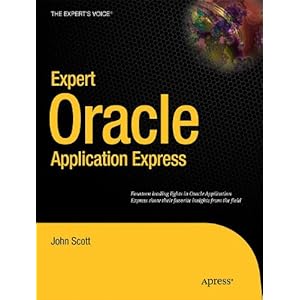
New APEX Book - Expert Oracle Application Express

Soon a new Oracle Application Express (APEX) book will be available... and it will be one you definitely want to have!


John Scott came up with the idea to do a special APEX book in memory of our passed away friends Carl Backstrom and Scott Spadafore, two members of the APEX Development team. John gives more details on his blog, so definitely read that too.

Next to the emotional value of the book, the content is unique and is not found anywhere else!
Thirteen different chapters, written by thirteen of the worlds best known Oracle APEX experts! The names are: Dietmar Aust, Doug Gault, Dimitri Gielis (myself), Roel Hartman, Michael Hichwa, Sharon Kennedy, Denes Kubicek, Francis Mignault, Anton Nielsen, Raj Mattamal, Daniel McGhan, John Scott and Martin D’Souza.

We all had one mission: share our passion, pass on all our knowledge, give you content you don't find anywhere else and go that extra mile to make this book, *the* APEX book.

Personal Experience with Writing

Although I already wrote articles before and was a technical reviewer on other APEX books, it was the first time I actually wrote a complete chapter for a book. It was quite an experience to say the least... I did enjoy the writing and even more focussing on the technical side of things and doing the research and testing etc. but I didn't realise it would take up so much time. Therefor I would like to thank my wife, my kids and my family for their support and to give me that time during the weekends and evenings.
Also special thanks to Hilary Farrell from the APEX Development team to review my chapter, even with her own tight deadlines.

About My Chapter

There wasn't a real rule about which topic which author took, but it all kinda spook for itself. I guess if you look at the names, you probably know that Anton wrote about security, Dan about Plugins, Francis about Globalization, ... I don't want to give all topics away yet... I'm sure the other authors will tell you soon :-)
The title of my chapter is "APEX 4.0 Charts Inside Out"... and there is a lot to tell about these charts! Apress (the publisher) told me to stop when I hit 80 pages, otherwise I think I was still writing! When you are passionate about something...
I hope that after reading my chapter you really understand how charts work, what they can give you and how you can create any chart you like. And remember... start to include charts in your APEX application (if you are not already doing) as they might trigger your manager to give you a salary increase! Managers love visuals!

Here are the sections of the chapter:

Overview 2
HTML Charts 2
Using the HTML Charts Wizard 2
The Result 3
Debug and Performance 4
Behind the Scenes 4
Other Opportunities linked to HTML Charts 5
Flash Charts 8
Background Flash Charts 8
Creating a Flash Chart 8
The Result 14
Understanding the Chart Region 16
Understanding the Chart Attributes 19
Adding Multiple Series and Combined Charts 28
Different Flash Chart Types 33
Behind the Scenes 35
Debug and Performance 40
Upgrading Oracle APEX 3.x Flash and SVG Charts 44
Screen Reader Mode and Charts 46
Extending Flash Charts 48
Customizing Charts by using Custom XML 48
Customizing Charts by using Custom XML, Dynamic Actions and JavaScript 51
Creating Charts Manually 54
Drill-down Charts, Dashboards and Interactivity 60
Simple Dashboard with Submit 60
Simple Dashboard with JavaScript 63
Complex Dashboard with Actions 67
Most Common Issues 76
Specific feature 76
Invalid #HOST# with Reverse Proxy or HTTPS 76
Flash Security Error 77
Charts in the Future 77
Caution 78
Resources 79
Summary 80

Hope you like the above!

The topics that didn't make it into the chapter were some more examples of the most asked requests in the APEX Forum and all the information about Gantt charts and Maps.
The way of working of Gantts and Maps are very similar to the "normal" charts, they just use a different Flash file and XML. But normally by the time you finish this chapter, you'll be able to answer all your questions you have yourself.
It might be that I'll publish an ebook about Gantts and Maps later in the year if I see many people would benefit from it.

AND NOW... (PRE-)ORDER THE BOOK! :-)

Friday, March 25, 2011

Last day Early bird Registration ODTUG Kscope11

Just a quick reminder to everybody who wants to go to ODTUG Kscope11 and didn't register yet... do it today! You can save 300 USD today as it's the last day for early bird registration.


If you are reading this post after Friday, 25th of March... use "APEX" as the discount code and you get 100 USD off.


If you want to know what I find about the conference... read this post where Mike Riley, president of ODTUG, interviewed me. The post includes also tips for sight seeing, food and shopping!

See you there...

Thursday, March 17, 2011

Oracle APEX 4.0 Cookbook

I just wanted to share there is another Oracle Application Express book out called Oracle APEX 4.0 Cookbook (released in December 2010).


The book is different from other APEX books around, in that respect that the two authors, Michel van Zoest and Marcel van der Plas, describe a problem and then explain how to solve it. There is actually a sample chapter free to download that shows how you create a multilingual APEX application. It gives a good idea how the other chapters were done.

I was actually one of the reviewers while they were writing the book. I started to go through their chapters at the end of May 2010.

I liked doing the reviews as it was interesting to see how they described how they would do something. I also like they added a section after every "cooking session", how it works. I do think it's important you know what is happening. Just to set expectations for people wanting the nitty-gritty details, Michel and Marcel didn't go into that much detail in describing how things work behind the scenes, but they scratch the surface so it gives you an idea.

I think the book definitely has an audience. People who followed a beginner training or learned APEX at their own and they want to know how to do a specific thing which is covered in the book, it's great to have the book, as you can just follow what the authors wrote and you also have an idea why it's done like that.

I have much appreciation for people who are dedicating their times to write a book. Most of the times the writing happens next to their regular jobs and I can guarantee the sentences don't come by themselves especially not for non-native English speaking persons.

Well done guys.

Tuesday, March 15, 2011

Non-Flash Charts for APEX - Released today!

It's with great honour APEX Evangelists is announcing today that Non-Flash Charts APEX Plugin (or in short: NFChart) is publicly available.


If you need great looking charts that run everywhere, including iPad, iPhone, iPod or just any device that doesn't have a Flash player/plugin, this product is definitely something you want!

NFCharts is very easy to use, it's just an Oracle APEX Plugin, so after installing this plugin it behaves as a native region. The plugin comes with a sample application so it's super easy to get started and have examples to your disposal.


Just as with the charts that are in APEX we have plugin text-items which you fill in and the chart will behave like that. If you need more we allow to customise anything you like!

And that is not all... we have a special launch offer too! If you order NFChart by 18-MAR-2011 you get a nice discount! The discount codes are SAVE75, SAVE100, SAVE150 depending the license type you go with.

Friday, March 11, 2011

Get most out of your Charts in APEX

Who doesn't love charts? I still have to see these persons... in fact I know some developers who got a salary raise because they made the life of their manager easy by including some nice charts in their APEX applications! So read on and get your salary raise in the next months!

APEX 3.0 included already charts way back in 2007, but with the APEX 4.0 release, the charts are taken to another level. Behind the scenes the APEX Development team included the AnyChart 5 engine where before (in APEX 3.x) they used the AnyChart 3 engine.
In APEX 4.0, charts are just on another level! You get so many more options declarative (through the APEX screens) and they look so much nicer. The APEX-team did a really good job. They also allow you to extend the charts for any other feature that is not available declarative by customizing the XML (in Chart Attributes set Use Custom XML to Yes).

If you wonder what the new AnyChart 5 charting engine can do, have a look at the Chart Gallery.
If you are searching for example how to implement these and see some of them in action in APEX, you can have a look at Hilary Farrell examples page. She explains nicely all the steps you have to do to implement a certain feature. You can also have a look for other examples on the AnyChart for APEX website.

If that is not enough to get your salary raise... you definitely want to have a look at all the other chart types AnyChart 5 provides! Oracle didn't license all the chart types in APEX, so although you might be able to change the XML so it uses a different type, it's not licensed correctly.
That is why APEX Evangelists and AnyChart worked together on AnyChart for APEX, which provides you with a valid license to use any chart type you want. There are now two versions available: AnyChart for APEX 3.x and AnyChart for APEX 4.0. The last one includes some plugins to make your life even easier! E.g. it comes with a Bubble Chart plugin so you can include that chart type very easily. You can download a free trial on the APEX Evangelists website once you are logged in.


Another great product from AnyChart is AnyStock. Also for this new charting engine we worked together with AnyChart to create an AnyStock for APEX product. If you want to do Time-based or Financial-based charting, you definitely want to have a look at the demo. Also for this product we offer a free trial on the APEX Evangelists website under Solutions > AnyStock for APEX.


So start making use from the charting capability in APEX or you might already do, so then you can enhance it even nicer ... and if you get that raise, put a comment on this blog post!

Wednesday, March 09, 2011

APEXBlogs v2 - iPad compatible, even charts!

It's very exciting to announce the new APEXBlogs site is now iPad compatible!
I find it so cool! Now you can look at the latest news on APEX everywhere.

Following enhancements where made to make the site iPad compatible:
  • If you navigate to apexblogs.info and you tab the + to add it to your Home Screen on the iPad, it gets a proper icon.
  • APEXBlogs is optimised to run in Landscape mode (iPad rotated left or right), if it's not then a popup message will appear to tell you, it looks even better if you turn the screen.
  • The other exciting enhancement is that you will see also charts now! As the iPad doesn't support to run Flash, we included NFCharts, the Non-Flash Charts APEX Plugin created by APEX Evangelists. If you are on your PC you still see the Flash Charts as there is only a redirect when there is an iPad/iPhone/iPod found. If you want to see the non-Flash charts also on your pc, go here. Look pretty similar no? I love our plugin and it will become available for sale very soon. Keep an eye on John Scott's blog as well as he will do more posts about NFCharts in the coming days too.


To get the site working nicely with the iPad, this website gave me good tips.

Hopefully some people can give it a try on their iPad. I know quiet a lot of people in the APEX community have one, so look forward what you think of it.

Call to the APEX Community - APEX Enhancement Requests

Looking at the statistics of the new version of APEXBlogs shows the "Knowledge Base" is not used that much yet. I really expected that would become one of *the* features what people would come back for.

We all enjoy working with Oracle Application Express (APEX), but it can always be better and for sure you thought at least once "I wish I had that feature in"... so why not register it straight on APEXBlogs? Just login to the site and Submit your Enhancement Request.


If you can't think of a new feature yourself, just go there and have a look what other people wished was in. You can then rate these features and give your feedback/comments on it.


I see a benefit to not only use it for Enhancements Requests, but also for bugs, or things you thought worked in a certain way, but didn't. It's always hard to know if something is implemented the way it works, but you expected something else, or a real bug.
Often the APEX Development team comment on the Forum, Blog Posts etc where they say this is bug 12345678 (which is not a My Oracle Support number) and it will be fixed in the next release. Or they reply, it's intended to work like this, but we might consider to allow ... in the next version or it will be implemented in APEX 4.1.

I really love to just be able to go to one place and find everything in there... so I count on all of you to make APEX even better than it is and by submitting through APEX Blogs we provide a single voice to the APEX Development team which will help them to see what is really important for all of us.

Thanks so much! I look forward to the first entry and comments in APEXBlogs :-)

Tuesday, March 08, 2011

New APEX Evangelists website online

Our new APEX Evangelists website is online now...


Sign Up now to be kept up-to-date about our Solutions, Consulting and Training activities.
You can also follow us on twitter @apexevangelists

We have been working hard on our Solutions and hope you like them... I'll do some more blog posts about them in the next days. So stay tuned :-)

Monday, March 07, 2011

Free Webinar - APEXBlogs v2 behind the scenes

My friends at Red Gate asked me if I would be interested to do a Webinar about the development process of the creation of the new APEXBlogs site and give some insights what's going on behind the scenes.


I happily accepted and the Webinar is now scheduled for April 6th - 4:00PM - 5:00PM GMT. (that is 6PM Belgium time)

I'll start with what I didn't like about the old APEXBlogs site and why I wanted to do the redesign of back-end and front-end. Next I'll go over development and some specific features I put in to conclude with the deployment. You'll also have the chance to ask me questions about this project and APEX in general.

Everybody is welcome to join this Free Webinar. Just go to the registration url and enter your details and you will receive the login details. All registrants will also be sent a link to the recording after the live event.

If you are interested, speak you then ...

Saturday, March 05, 2011

APEXBlogs (v2) - EA Live!

I just put APEXBlogs (v2) EA (Early Adopter) online...

Goal is to gather as much feedback as possible! Any issues, remarks or just your thoughts please use this blog post to add them or use the Feedback button on the APEXBlogs site itself.


Known Issues:
  • Internet Explorer 7 and lower compatibility: the search is not aligned like in other browsers
  • iPad resize on Home Page gives white band on right hand side
  • Charts in Statistics and APEX Usage won't load on the iPad/iPhone
Goal is to have most issues ironed out for the beginning of next week. I'll do some more blog postings in the next days with some more background about this site.

So go quickly to the new APEXBlogs site and try it out! Hope you like it.

Wednesday, March 02, 2011

APEXBlogs v2 - Search

This post is part of the 10 days of APEXBlogs. This series of blog posts highlight the features of the new version (APEXBlogs v2) of APEXBlogs.info which will be released shortly.

Post 10... the last post before the launch of the new APEXBlogs!

In April last year I already blogged about the nice search in APEX 4, but wouldn't it be nice to have such functionality in APEXBlogs too?

I didn't think it would be interesting to do the number search to go straight to an App and Page, but typing in a text and getting all the results throughout the application is a nice timesaver.
(the screenshot is from APEX itself, you will see the one in APEXBlogs when it launches...)


So that is exactly what I build in APEXBlogs. You type in a text and it will retrieve all the blog posts, tweets, plugins etc where the search string appears in.

If you want to create such a search in your application yourself, here are the steps to do that:
  1. Create a Page and give it an Alias of SEARCH
  2. Create an Interactive Report Region on that page based on the tables and columns you want to search in
  3. Create a Region with an Item called P0_SEARCH on Page 0
  4. Create a Dynamic Action on Page 0:
    - Event: Key Release
    - Item: P0_SEARCH
    - True Action: Execute Javascript Code:
    if(this.browserEvent.keyCode == 13) {
    window.location = 'f?p=&APP_ID.:SEARCH:&APP_SESSION.:::RIR:IR_ROWFILTER:'+$v('P0_SEARCH');
    }
That's it... you will have an amazing search in your application now.

Tuesday, March 01, 2011

APEXBlogs v2 - Knowledge Base

This post is part of the 10 days of APEXBlogs. This series of blog posts highlight the features of the new version (APEXBlogs v2) of APEXBlogs.info which will be released shortly.

This is the 9th post... and is about a new feature in APEXBlogs called "Knowledge Base".

It consists out of three different parts (copied directly from the new APEXBlogs site):
--
Quick Tips

There're so many smart people out there, just like you, but they don't really want to start a blog. What about write a quick tip on this website? Once you are logged in you can share any tips, and your views on APEX in this area. Why just keep it in your head if you can share it with others?

Forum Mining

The APEX Forum is a great source of information, but many questions get repeated or answered only after a few iterations. This area will mine the forum for interesting questions and answers so you find the solution easily and fast.

APEX Enhancement Requests (and bugs)

You found a bug or want to have something just a bit different to work in APEX? Or you have a wish list of features you'd like to have in the next version of APEX? This area is exactly meant for that! So start to review the existing enhancement requests, comment on it and vote for the ones you like most or submit a new request when you can't find it.
--

What do you think? Will the above be useful and work?

Here are my reasons why I included it:
- I've seen so many posts out there about feature requests for ex. and then in the forum you have the same, but there was not a single place of the "truth", what the community wanted.
- In APEXBlogs v1 you could already write Quick Tips or Blog Posts it was called there directly from the site, but it wasn't used that much. By moving it to the knowledge base I hope people will start using it again more.
- And finally Forum Mining... a thing Steve Howard, John Scott and myself talked about for the first time, 4 or 5 years ago now and never did it... it's hard to do and very time consuming. For this section I'm searching for "Editors". The Editor will basically help to make this section a success. The way I see it working is that everybody can submit a link, but the editors will mine it. Or the alternative is that people mine it and the Editors review it.

Would anybody be interested in being an Editor on APEXBlogs?
(to be an editor I expect you have at least a few months APEX experience)

Sunday, February 27, 2011

APEXBlogs v2 - Statistics

This post is part of the 10 days of APEXBlogs. This series of blog posts highlight the features of the new version (APEXBlogs v2) of APEXBlogs.info which will be released shortly.

So far I blogged about:
  1. Backend changes
  2. Showing the blog posts APEX 4.0 style
  3. Twitter sync for #apexblogs and #orclapex
  4. Plugins section
  5. Links
  6. APEX Usage
  7. Make your APEX app iPad compatible
  8. Statistics (this post)
I guess you know by now I really like playing with charts (and numbers)... what about some statistics about what's happening in APEX world?

I included statistics about the number of Blogs, Blog Posts, Plugins, Tweets and Links in the new APEXBlogs site:


Once the new APEXBlogs goes into production I plan to add statistics about number of visitors and which countries are accessing the site the most.

If you can think of other statistics you want me to include, feel free to add a comment to this blog post.

Two posts to go before the launch...

APEX 4 (bug) - Series Type (Bar, Line, Marker) and Multiple Series

A new feature in APEX 4.0 is that you can define per series what you want the series type (Bar, Line or Marker).

Lets start with an example.

We create a 3D Column chart based on the salary of the employees.

Our first Series looks like this (the Series Type is per default Bar):

select null as link, ename, sal
from emp

Now to add a second series you have two choices, either you add another value to the existing series or you create a new series. We will go with the first option, so our query becomes:

select null as link, ename, sal, nvl(comm,0) as comm
from emp

If you run the chart you see for both salary as commission a bar (column)

Now we want to add a line with the average of the salary, so we add another series with as sql query:

select null as link, ename, avg(sal) over() as avg_sal
from emp

The Chart Series look like this


Make sure you select Line as Series Type for Series 2 (the average salary)


When you run the chart you expect to see the same chart as above but with a line that represents the average of the salary...
As you can see that is not really what happened. It seems there is a bug in APEX 4.0.2.00.07 (and probably before) with defining multiple series in the same query.

What happened is that the first value, salary, is still a bar, but the second value, commission, changed from bar to line and the third value, average salary, became a bar (that is because our main chart type is a 3D Column chart, so it takes whatever is default). So APEX doesn't take the Series type into account correctly.

The workarounds is to not use the single query with multiple values, but a single query per series.


Running the chart again shows us what we expected

(Found in APEX 4.0.2.00.07)

APEX 4 (bug) - Chart Attributes > Add Series > Build Query button

Let's pretend you still have that 3D Column chart of my previous post or create a new chart.
Now edit the chart and go to Chart Attributes and look for the Chart Series section.


Click the Add Series button, you'll get a screen like


Hit the Build Query button to open the wizard to generate the SQL statement and follow the wizard. Define the owner

Define the table or view

Define the Label and Value...

Hmm... the value option is not here... yes, that is a bug... if you go further with the wizard you will end up with "select * from emp" instead of a real query for the chart.

The strange thing though is that during the creation of the chart it works just fine. Also when you edit an existing series and hit the Build Query button it works ok as you can see on the next screenshot.

My guess is there's something wrong with session state.

The workaround is to edit an existing series, follow the wizard there, copy the sql statement, cancel the edit, and then add a new series and paste the sql statement. Or if you are more experienced and know the syntax of the chart you can just manually enter the sql statement.

(Found in APEX 4.0.2.00.07)

APEX 4 (bug) - Font Grid Label in Charts

For a chart you can define the fonts and colors you want to use for the different components (mostly text) on the chart. This works great except for the Grid Label. It seems that that value never gets stored when you change it.


I thought if I wanted to change the grid lines of the chart I could change the Grid Label settings. I'm not sure why Label is specified after Grid and not Line, as I'm not aware of labels against the grid. It seems that currently there is a hardcoded value of "Black" against the line color of the X axis grid and nothing for the Y axis grid (so default of AnyChart).

Again the workaround is simple if you want to have a different line colors of the grid (X / Y Axis), you can just change it in the XML after you specified Custom XML = Yes.

The chart looks like this after doing the above change:

(Found in APEX 4.0.2.00.07).

APEX 4 (bug) - Axes in Charts

Consider this chart, it just shows the salary of the employees in a 3D Bar chart.

Now, if you want your chart to start with e.g. 500 instead of 0 you need to define the axis minimum value.


The wizard shows X Axis: Min, so lets put 500 as the value in... However running the chart again gives the same result.

This is in fact a known bug in APEX 4 (bug id 11700598), or you can read on it in this forum thread. Basically the Axes Settings should show the Y Axis Min instead of the X Axis.

The workaround is to change your chart type to 3D Column (instead of 3D Bar Chart).
Running the page gives us this result, so yes it's different, but for this chart the wizard is correct. Later you can change the chart type again and it should be ok.


So again we want the Y Axis to start with 500 instead of 0, so we define the Y Axis: Min in the Axes Settings. (see that now Y Axis: Min is listed and not X Axis: Min)


Run the page again and the chart will start from 500 instead of 0.

So now you can change the type back to 3D Bar Chart and you see it applied the start value correctly (the axis start now from 500).

My recommendation to the APEX Development team would be that either we see both X and Y Axis min and max or add a dynamic action to the drop down list of the chart type to dynamically show the appropriate axis. (next to fixing the bug)

!! But there is even a nastier bug related to the above...

Let's say we kept the 3D Column chart type but added a scrollbar for the X-Axis.


Running the page shows us this! The chart is only partially visible.


This is related to the previous bug... as we defined a value of the X-Axis Min when the chart type was still 3D Bar Chart, APEX still keeps that into account... (that is why the workaround worked before). However in this case it has a negative impact on the way the chart is shown.

The way to correct the issue is, change the Chart Type back to 3D Bar Chart, delete the value that is in X-Axis Min, hit the Apply Changes button, edit the chart again and change the Chart Type back to 3D Column.

Running the page again shows the correct chart.


(Found in APEX 4.0.2.00.07).

Saturday, February 26, 2011

APEX 4 (bug) - Gradient in Charts

Something surprised me in APEX 4.0.2.00.07 (and probably entire 4.0).


APEX allows to specify a Gradient Angle when you specify two background colors for the chart and put the Background Type to Gradient. (see screenshot)


A value of 0 degrees results in a horizontal gradient with the first background color on the left and the second background color on the right.

Running the page results in:

Cool isn't it? ... But I just wanted it a little bit different, I wanted the first color (green) on top and the second color (yellow) at the bottom. So I would have thought if I change the value of the Gradient Angle to 90 that will do it... but no, the same (or very very similar).

Looking at the XML that was generated it showed me:

So although I put 90 degrees in the Gradient Angle, it seems like APEX divided it by something close to 60...

If you want the same as me and really use the Gradient Angle you either have to multiply your value by 60 or change the XML yourselves (Custom XML = Yes and you can change it). I prefer the second option as if they fix it (as I can't believe it was intentional!) you end up with a different gradient angle.

Happy charting ...

APEX 4 (bug) - Add marker to your chart

It seems to me that in APEX 4.0.2.00.07 (and probably entire 4.0, but can't check at the moment) there's a bug with adding markers to your (bar/column) chart. For a Pie chart it works fine.

If you edit your Chart Attributes you can define a Marker in the Display Settings.


However when you run the page and look at the chart there is no Marker to see.

If you need Markers, there are two workarounds at the moment:

- customise the XML (my preferred option): you set Custom XML in the Chart Attributes to Yes and you change the marker section to the marker you want. You will see marker type="None", but you can easily change that. Below I changed it to Cross, to have a cross marker.

- add another Series in the chart of type Marker, but this is not my preferred option because you lose performance as it will need to run the query twice.

When you run the page after you changed the XML, the chart with the marker looks like this (see the cross on top of the bar):


I'm sure the APEX development team will fix it soon, but for now you know a workaround.